

Nowadays, developing mobile apps that come with multiple languages is common. To support different languages in Android, the standard way is to create separate strings.xml files for each language.
res/ values/ strings.xml # English values-fr/ strings.xml # French values-es/ strings.xml # SpainIf there is a request to replace a wording in the app that was different from the design. It will take time for developers to search and change the text, which may take 5 to 10 minutes for this simple work. Because no one can read the code but only the developer.
Solution
Google Spreadsheets is the platform that anyone can use, therefore the whole team can manage and make changes to this.
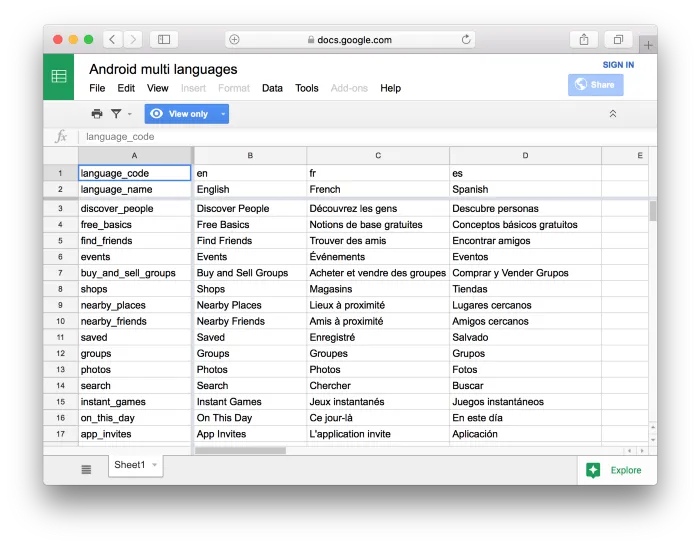
- Developers will refer to key strings column
- Others such as content editors or translators can modify the content in language columns
Then it can be exported to separate XML files by writing a script for this automatic job. Now, anyone can manage the app content in a single place.
Export Spreadsheets to XML
We can write the script to export it in any language. In this example, I use python and pygsheets, since it comes with a suitable way to achieve this.
import pygsheetsimport xml.etree.ElementTree as ETimport xml.dom.minidom as minidom
# Replace your google spreadsheet urlspreadsheets_url = "https://docs.google.com/spreadsheets/d/1tPFOoIlY9II-di66tmyzYdcUM_5o_NpNIVdAfnYzCLU"# Replace your google authorization credentialscredentials = "client_secret_770262086400-rmu5819knvu2rasoe9acp8elcodih4ce.apps.googleusercontent.com.json"
gc = pygsheets.authorize(credentials)sh = gc.open_by_url(spreadsheets_url)wks = sh.sheet1
def export(language_column, file_name): root = ET.Element("resources") for idx, row in enumerate(wks): if idx < 2: # skip two rows on header continue ET.SubElement(root, "string", name=row[0]).text = row[language_column] xmlstr = minidom.parseString(ET.tostring(root)).toprettyxml(indent=" ", newl="\n", encoding="utf-8") with open(file_name, "w") as f: f.write(xmlstr)
export(1, "en.xml")export(2, "fr.xml")export(3, "es.xml")How to use
- This was scripted with python 2.7, and requiring to install pygsheets
- Follow this instruction to get authorization credentials to make Google APIs requests
- Place the credentials in the same folder with exporter.py
- Execute the command from the terminal
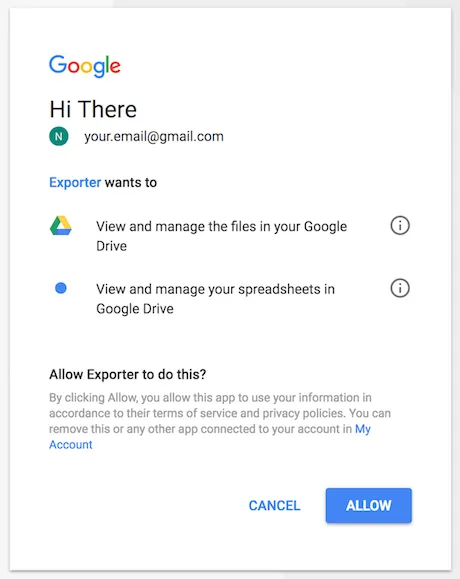
python exporter.pyIf this is the first time, the permission request will appear, and we need to grant it.
Result
As a result, it will generate 3 XML files en.xml, fr.xml, es.xml that declared in the sheet. Then developers just overwrite the new files in their project.
<?xml version="1.0" encoding="utf-8"?><resources> <string name="discover_people">Discover People</string> <string name="free_basics">Free Basics</string> <string name="find_friends">Find Friends</string> <string name="events">Events</string> <!-- ... --></resources>